

OpenSheetMusicDisplay (OSMD) 2.2.1 is here, and while it’s a point release, it packs a serious punch: 66 bug fixes alongside several new engraving options. Released on October 12, 2026, this update sharpens how OSMD reads and lays out dynamics, slurs, articulations, lyrics, ties, and multi-voice passages — and it fixes several cases where re-rendering or renderNext() gave a different result than a fresh render.
What’s New in OSMD 2.2.1
Here are the highlights worth upgrading for:
- A new
EngravingRules.VexFlowTextFontFamilysets the font family for the texts VexFlow renders in its own fonts (rehearsal marks, metronome marks, D.C., tab numbers). - Slurs no longer run into the staccatos, accents, fermatas, fingerings or ornaments at their ends — accents and fermatas now go outside the slur, with the slur at the note.
- Dynamics written in a note’s
<notations>are now read (71 of the 97 dynamics in a Haydn sample were previously missing). Dynamics, wedges and words are placed at their exact offsets, and neighboring dynamics and wedges line up at one height. - Notes of two or three voices a second apart are staggered correctly. Where voices share a staff, articulations and ties go on the stem side, and fingerings are centered on their own notes.
- Re-rendering after a resize or zoom change no longer drifts from the first render, and
renderNext()now works for sheets with several pages.
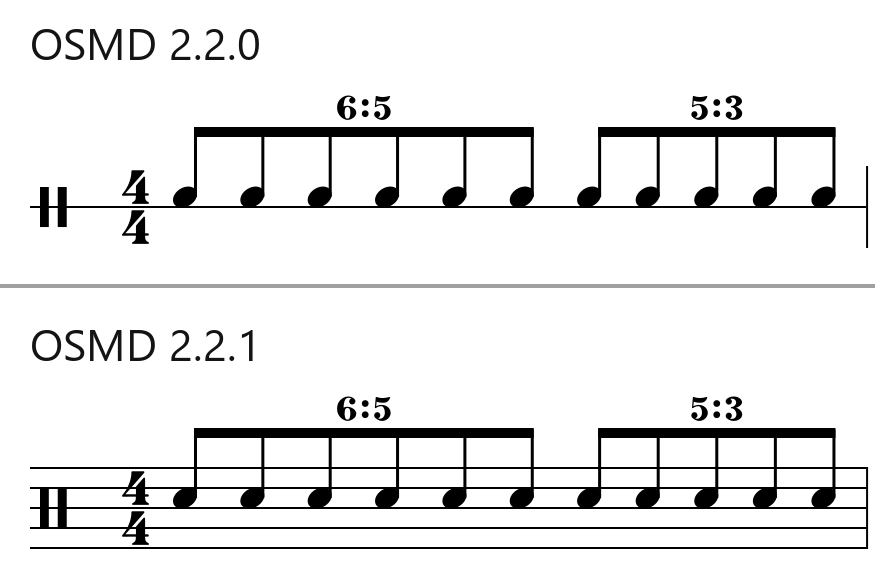
Two changes you may notice — each with an option to switch back: percussion parts keep the staff lines given in the MusicXML (EngravingRules.PercussionKeepXMLStafflineCount), and a verse number now stands left of the first lyric of its verse (EngravingRules.LyricsVerseNumberLeftOfLyric).
Using the New Engraving Options
All of them are set on osmd.EngravingRules before rendering (RelinkLyricWordsAcrossVoices before loading). Three are on by default, so you only need them to get the 2.2.0 behavior back:
import { OpenSheetMusicDisplay } from "opensheetmusicdisplay";

const osmd = new OpenSheetMusicDisplay("container");

// New in 2.2.1: the font family for the texts VexFlow renders in its own fonts
// (rehearsal marks, metronome marks, D.C., tab numbers). Default: VexFlow's fonts
osmd.EngravingRules.VexFlowTextFontFamily = "Times New Roman";

// On by default since 2.2.1. Set them to false for the 2.2.0 behavior:
// percussion staves with few note positions on one line, whatever the MusicXML's staff lines
osmd.EngravingRules.PercussionKeepXMLStafflineCount = false;
// the verse number at the note, and the first lyric right of it
osmd.EngravingRules.LyricsVerseNumberLeftOfLyric = false;
// no dashes between syllables that alternate between voices (read when loading)
osmd.EngravingRules.RelinkLyricWordsAcrossVoices = false;

await osmd.load(musicXml);
osmd.render();Slurs That Clear the Marks at Their Ends
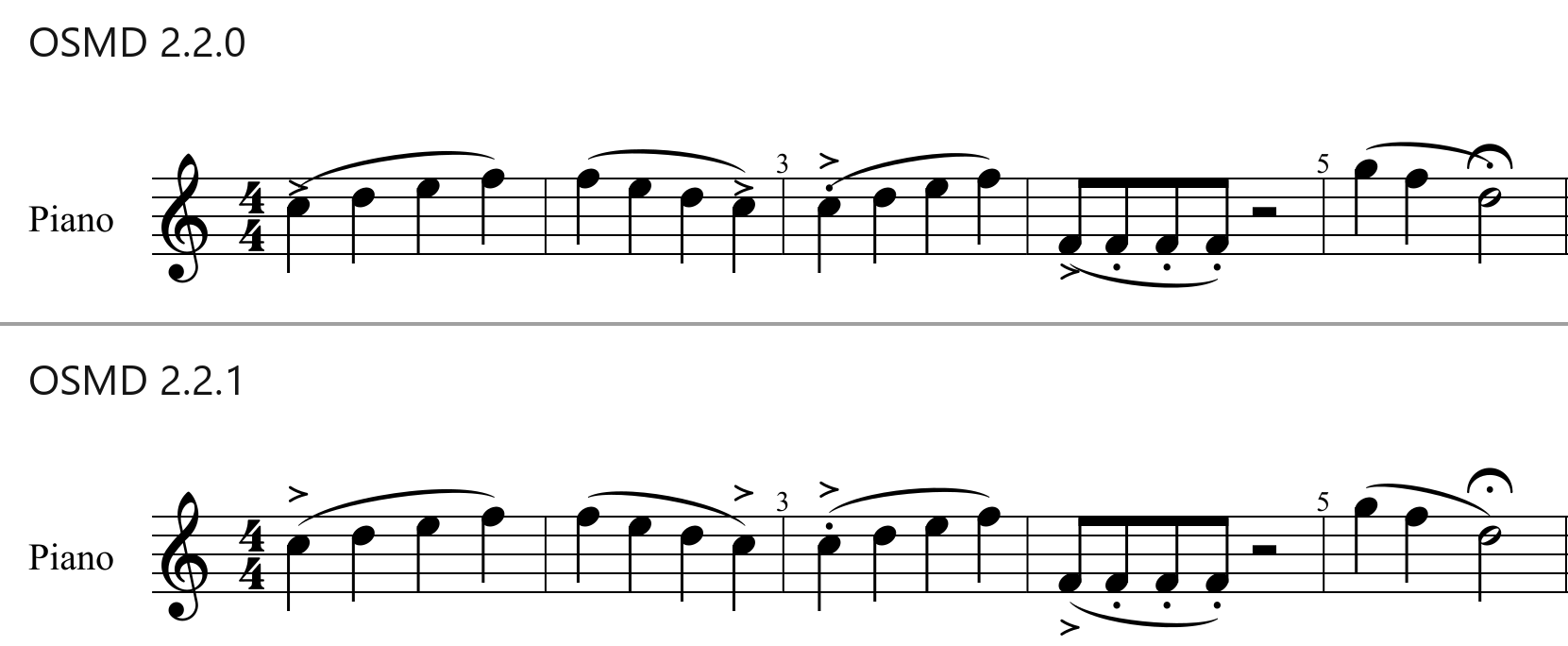
Slurs used to start or end on the staccatos, accents and fermatas of their first and last notes. Now staccatos and tenutos go between the note and the slur, while accents, marcatos and fermatas go outside it, with the slur at the note, as in Elaine Gould’s Behind Bars (pp. 121–122, 188–189). Slurs also keep clear of the fingerings and ornaments at their ends, and start and end beyond the beam on the stem side of beamed notes.
Articulations: Marks at the Stem End for Shared Staves
When two parts share a staff, articulations without an explicit placement now go to the stem end instead of landing on the other voice’s note head — following Elaine Gould’s Behind Bars (pp. 117–118). Previously, an accent above an A4 could land on a C5’s head between the voices.
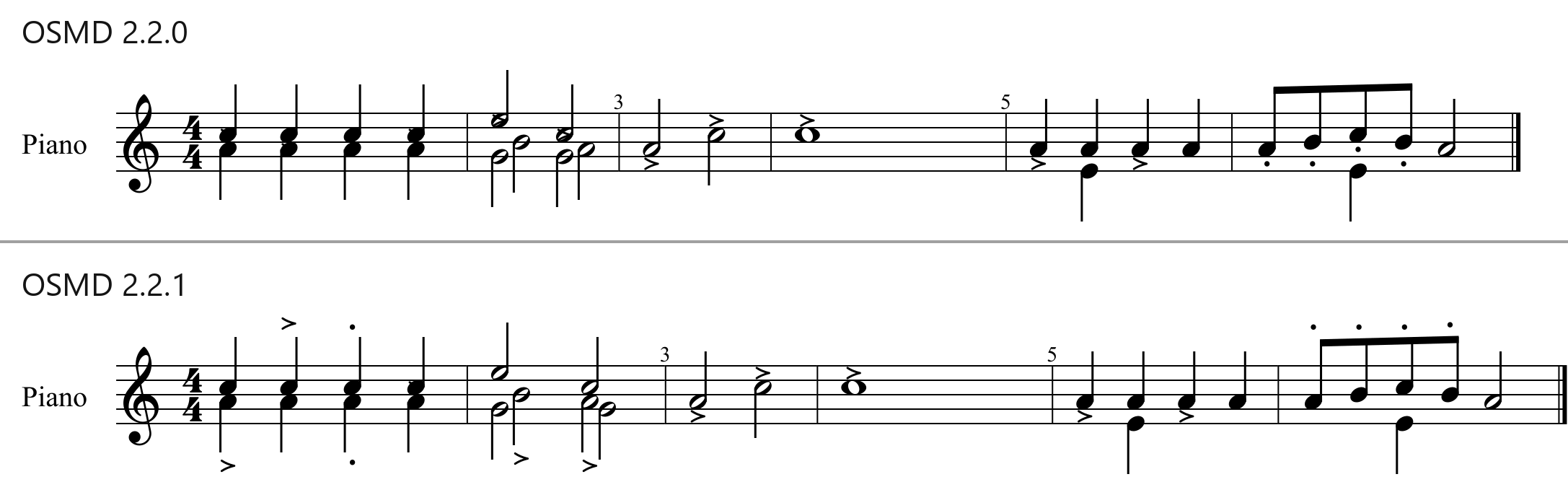
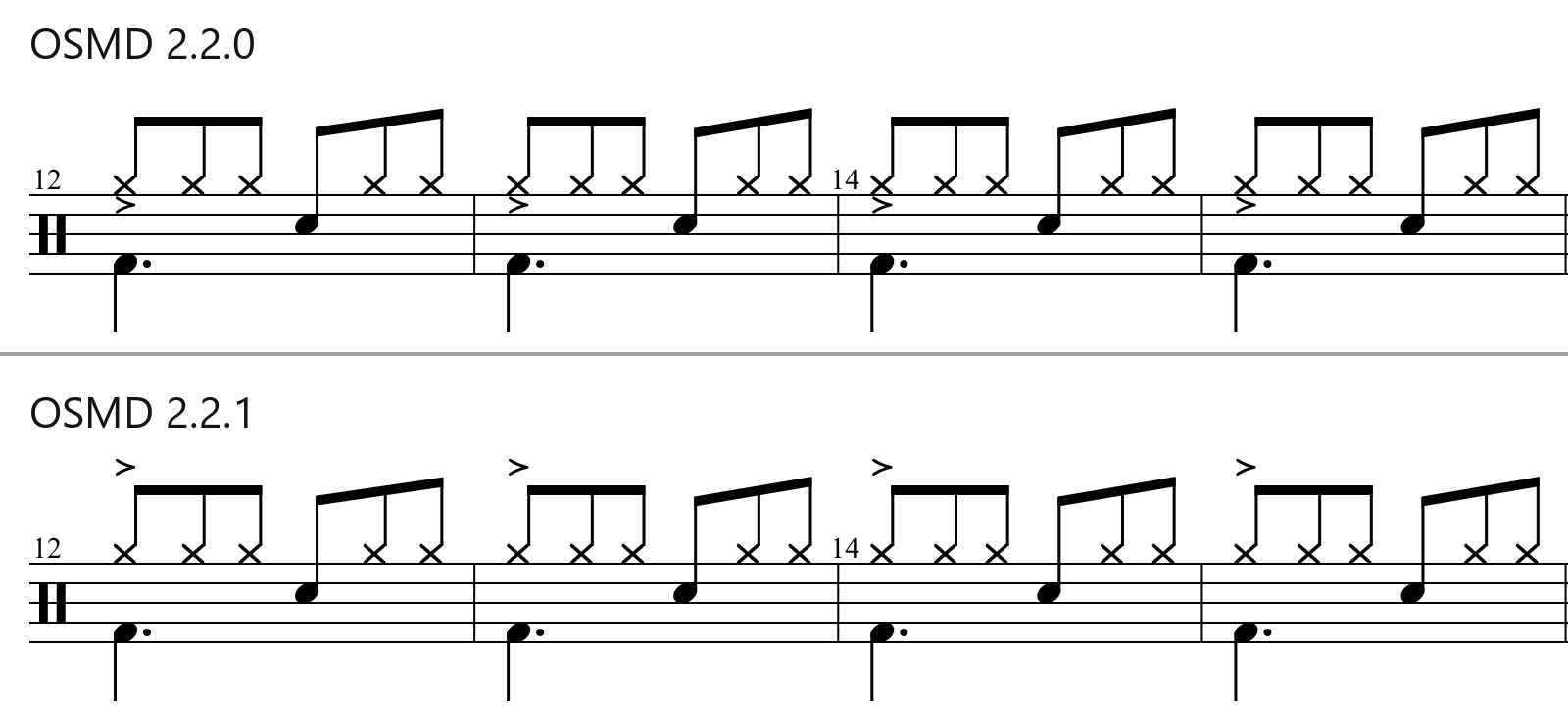
In a drum part, the hi-hat’s accents were drawn between the voices, under the x note heads inside the staff; now they are above the beams:
Correctly Staggered Voices a Second Apart
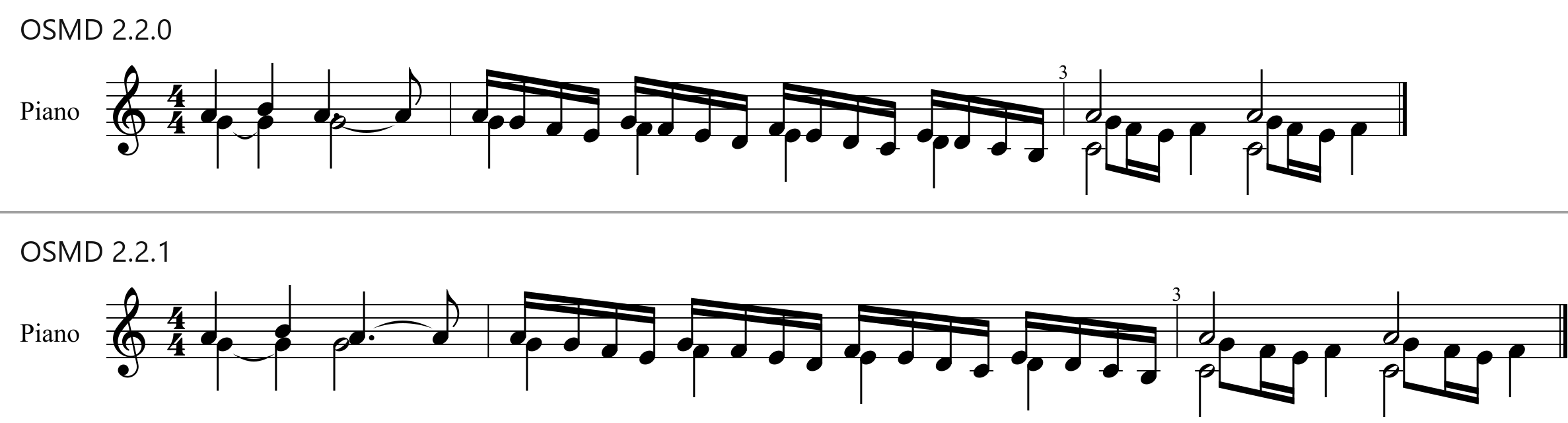
When two voices sit a second apart, OSMD now makes room in the spacing for a staggered note, so the next note doesn’t run into it and a tie from it keeps its length.
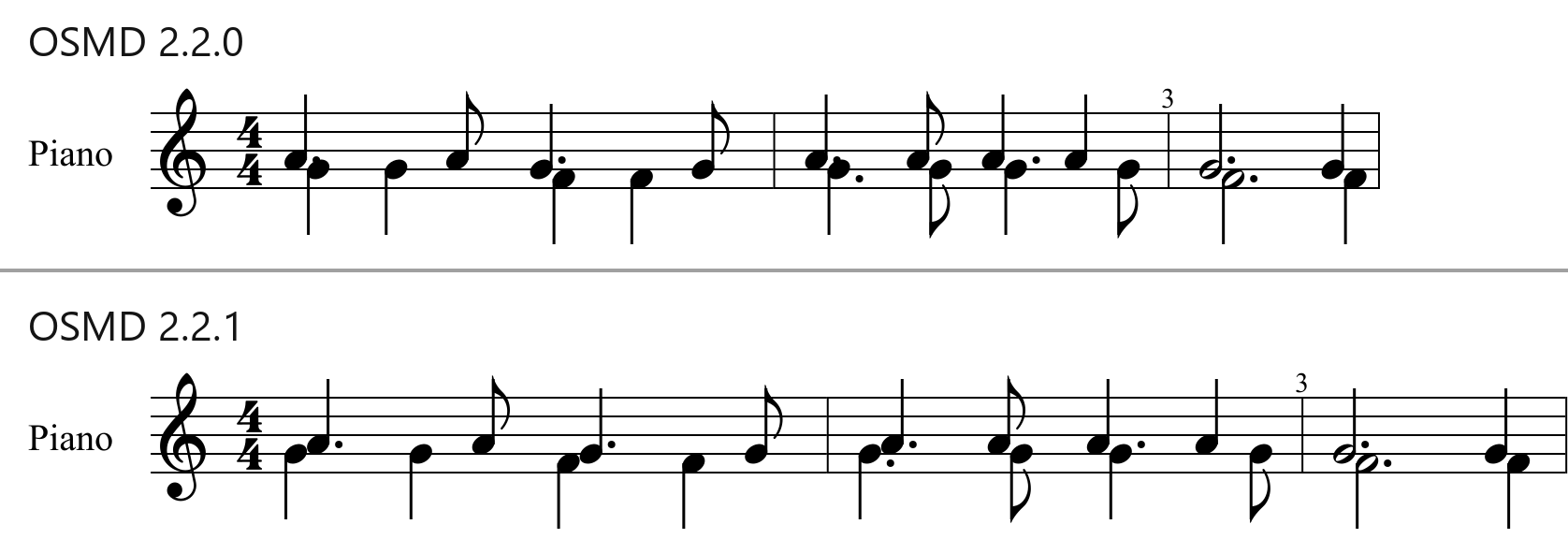
A related fix staggers a dotted upper note instead of the lower note a second below, which used to cover its dot.
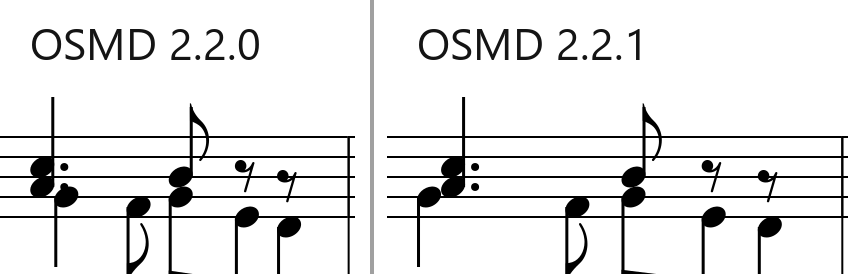
And in a real score, measure 4 of Peter Cornelius’ Christbaum:
Smarter Dynamics and Expressions
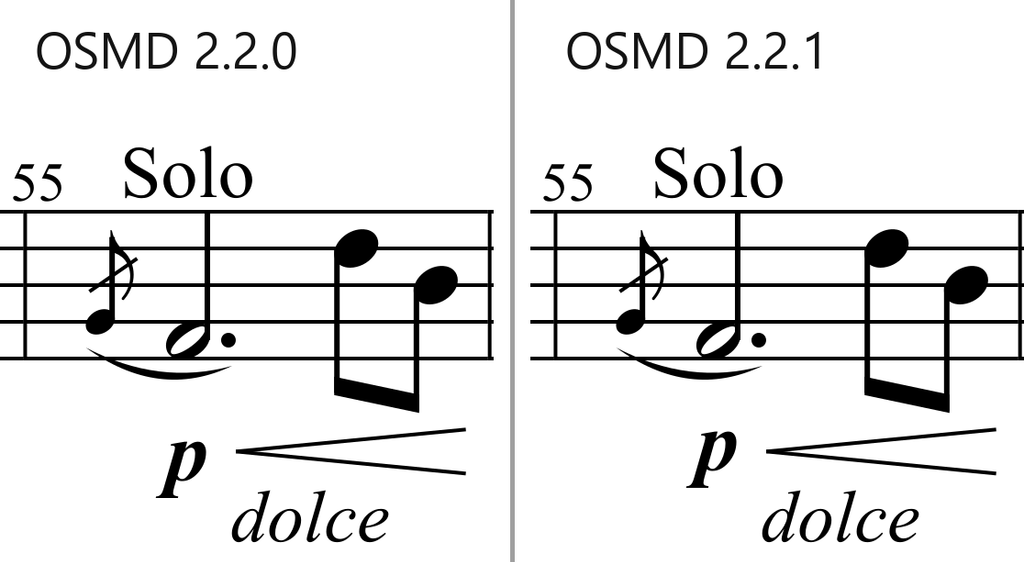
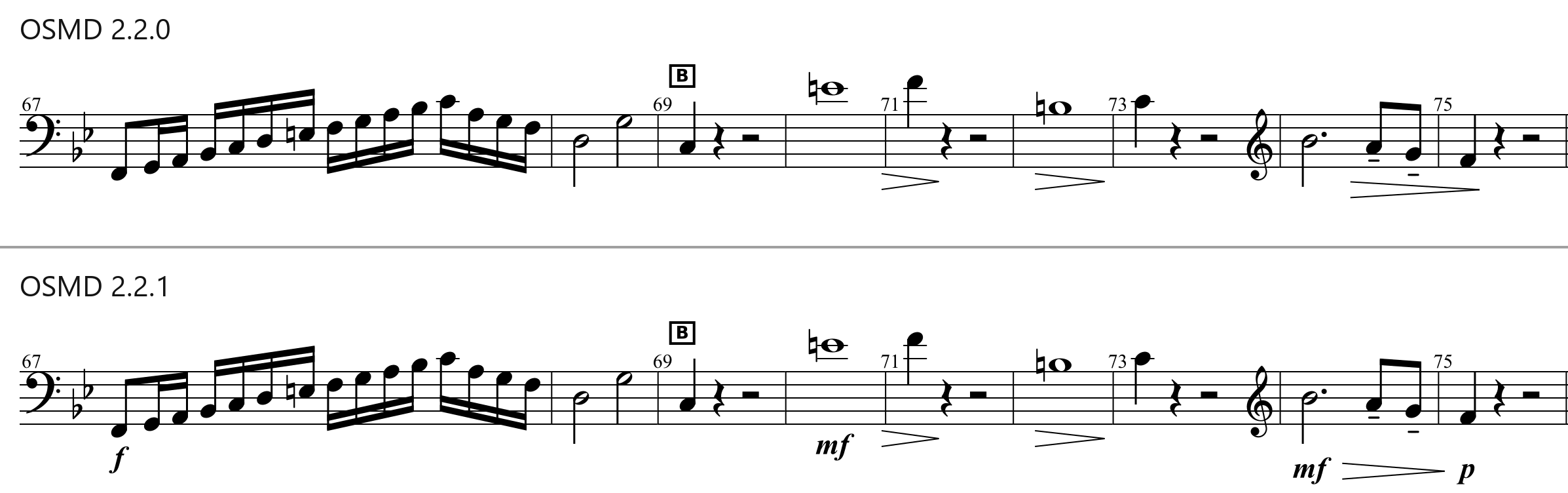
Dynamics written in a note’s <notations> (instead of in a <direction>) are now read and drawn at the note with their own placement: OSMD used to skip them. Dynamics and wedge starts are placed at their offset in divisions rather than being scaled by the preceding note’s length, and close dynamics now align at exactly one height, with wedges pointing at the middle of their neighbors’ letters, e.g. “p” and the crescendo wedge here:
In the cello part of Haydn’s Sinfonia Concertante, one of OSMD’s test samples, 71 of the 97 dynamics were missing, e.g. in measures 67–75:
Chord Symbols Placed Where They Belong
Chord symbols now align to what is actually under them where they are drawn. A chord symbol that isn’t over a note no longer lifts the whole row above the clef, and with ChordSymbolYAlignmentScope "measure" they no longer climb from measure to measure.
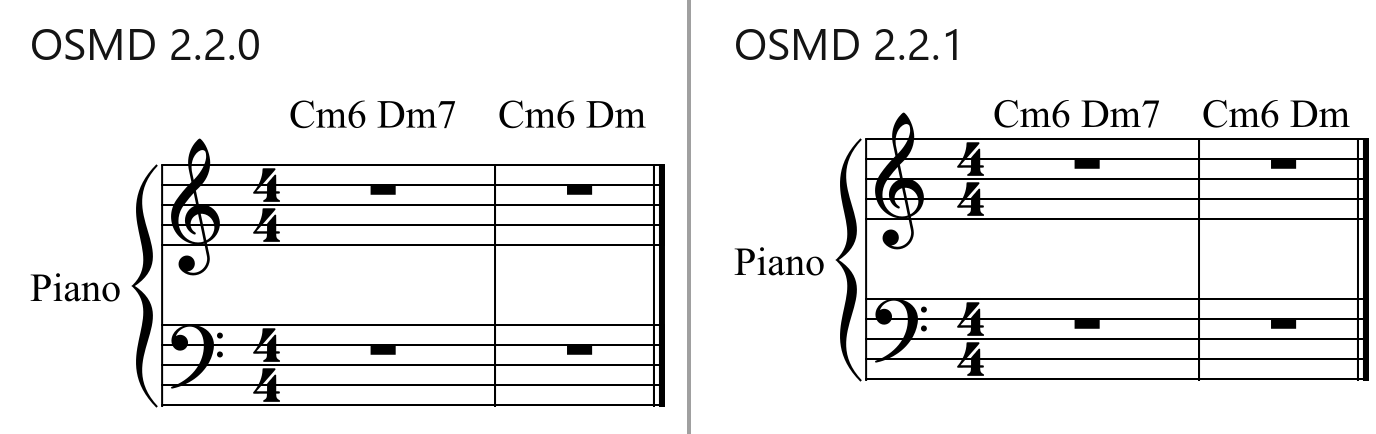
(If you prefer the larger distance, increase EngravingRules.ChordSymbolYOffset (default 0.1, in staff spaces): 1.4 gives the distance of OSMD 2.2.0 in the example above. Since 2.2.1, the staff makes room for a larger offset, so words, rehearsal marks and voltas no longer end up on the chord symbols.)
Lyrics, Ties, and More
- Lyrics: dashes are drawn for words whose syllables alternate between voices (closed-score SATB), lyrics with line breaks start on the line of their verse, and lyrics stay clear of accidentals and stems under the start of a word.
- Ties: each tie between tied notes is drawn once (not several times when four or more are tied), ties curve on the stem side where two parts share a staff, and ties across a system break keep their given direction.
- Coloring and hiding:
setColor()andsetVisible()now also apply to the slides and glissandi starting at a note (applyToGlissandi) and to the H and P labels of hammer-ons and pull-offs, andsetVisible(false)hides both parts of a tie across a system break. - Octave brackets: chord symbols, dynamics and words now go outside an octave bracket (8va), with the bracket closer to the notes.
- Glissando: a glissando now draws into the next system across a courtesy key or time signature instead of stopping rendering with an error.
- Transposing: E# in F# major and D# minor is spelled like the key signature, and note spellings are kept when transposing by octaves. Two new
IntervalTransposeCalculatoroptions:SimpleChordSymbolSpelling(on by default) spells transposed chord symbols the way lead sheets do, e.g. Emaj7 instead of Fbmaj7, andAvoidDoubleAccidentals(off by default) avoids double sharps and flats in the notes (see Transposing in the wiki).
Reliable Re-rendering and Incremental Rendering
Re-rendering, e.g. after a resize or zoom change, no longer drifts from a fresh render where it did in 2.2.0: the beams of unison notes in two voices, the height of chord symbols not over a note, and the dots of dotted rests, which crept up a staff space with each render. renderNext() now renders sheets with several pages, finishes with RenderSingleHorizontalStaffline for a single staff and across system breaks, and draws measure repeats, wedges, octave shifts, glissandi and lyric extenders like render().
Improved Visual Regression Tests
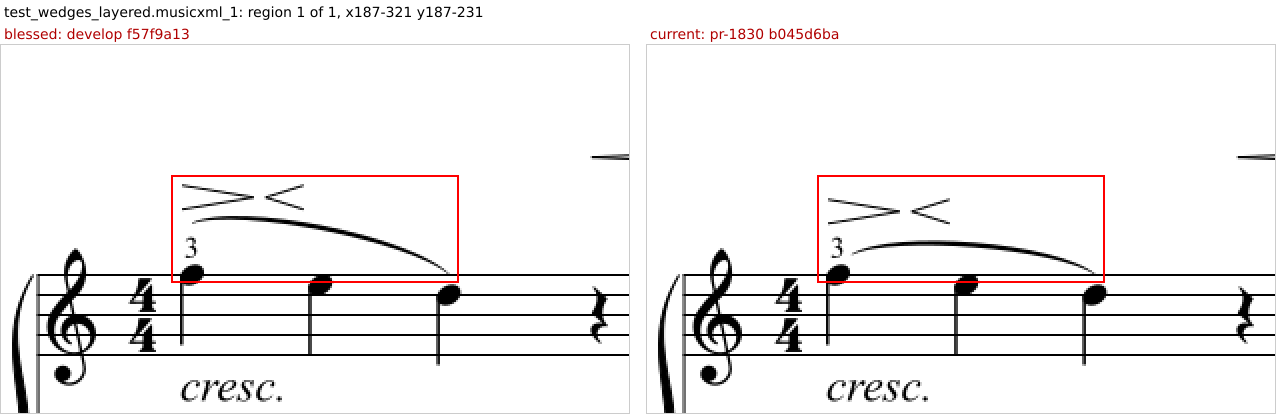
The visual regression tooling got better too: it now writes crops of the exact regions of the sheets that changed, and diff/diffs.txt lists the changed samples and names the branch, commit and subject of the blessed and current renders being compared (see Testing in the wiki).
Upgrade Today
OSMD 2.2.1 is a low-risk, high-reward upgrade for anyone rendering MusicXML in the browser. Grab it from npm or the GitHub release page, and read the full changelog for every fix. Thanks to kawato3, isc, gifflet, dotkebi and mitchi-0719 (first contribution!) for their contributions via pull requests!


