

Open a Chinese pop songbook or a guzheng method and you’ll find numbers where you’d expect noteheads. That’s Jianpu (简谱), numbered musical notation, and for a lot of musicians it’s the notation they read every day.
In July 2024 we put Jianpu mode into early access for our sponsors. It now runs on OSMD 2.2.1, which makes it about three times faster, and in the first days of October alone it got 12 new features and more than 20 fixes. Here’s why we keep at it, and what you get today.
Why Jianpu matters
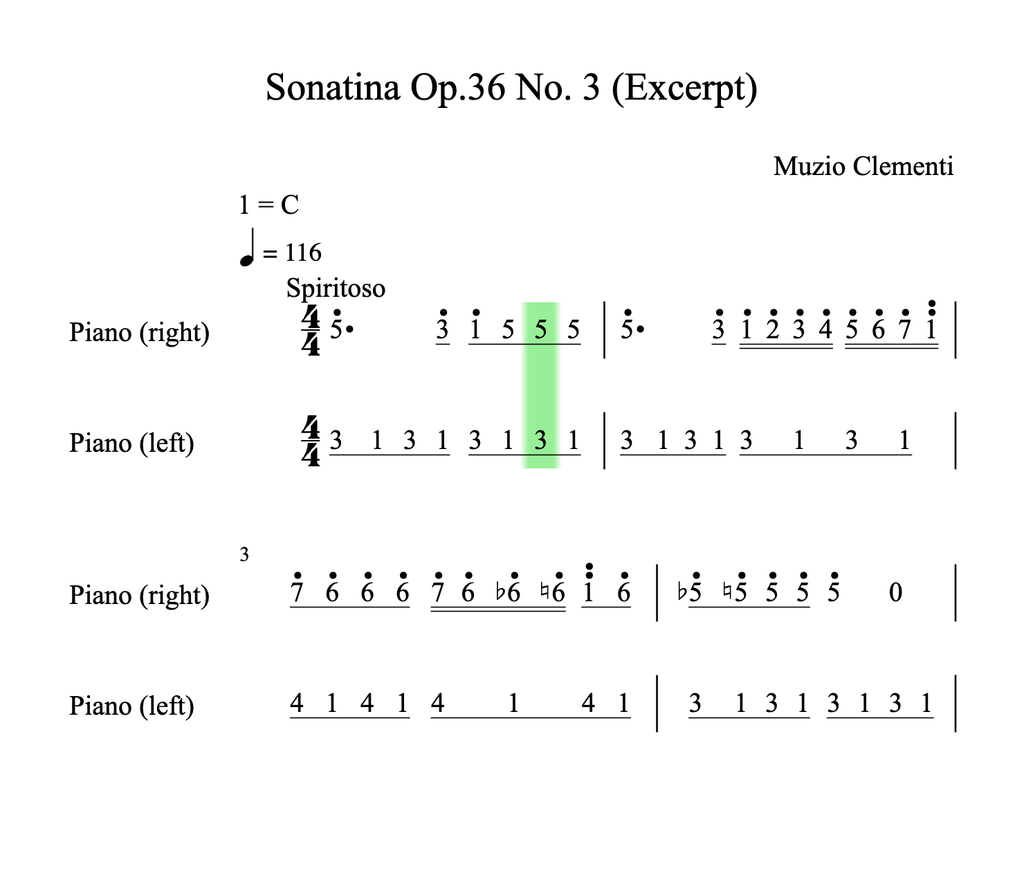
Jianpu is popular in mainland China, Taiwan and Hong Kong, and in Chinese communities around the world. Indonesia uses a variant of its own called not angka. Most Chinese traditional music and popular songbooks are printed in Jianpu, and vocal scores often carry it next to staff notation (Wikipedia).
You can learn to read it in a few minutes:
- 1 to 7 are the steps of the scale (do re mi fa sol la ti). 0 is a rest.
- A dot above or below a number moves it an octave up or down.
- Each underline halves a note. Each dash after a number adds a beat.
- “1 = D” at the top sets the key.
That last line does a lot of work. Jianpu is movable do: 1 is always do, and “1 = D” says which pitch that is. A tune you know as 5 3 1 stays 5 3 1 in every key, so a choir can sing a song a tone lower without anyone relearning their part.
So if you’re building a music education app or a choir tool for these markets, staff notation alone isn’t what many of your users learned to read. That’s also how Jianpu mode started, as a project for a partner in Asia.
Fun fact: Jianpu has French roots. It’s based on the Galin-Paris-Chevé system, a 19th-century teaching method (Rousseau had presented a similar idea to the French Academy of Sciences in 1742), and it reached China by way of Japan.
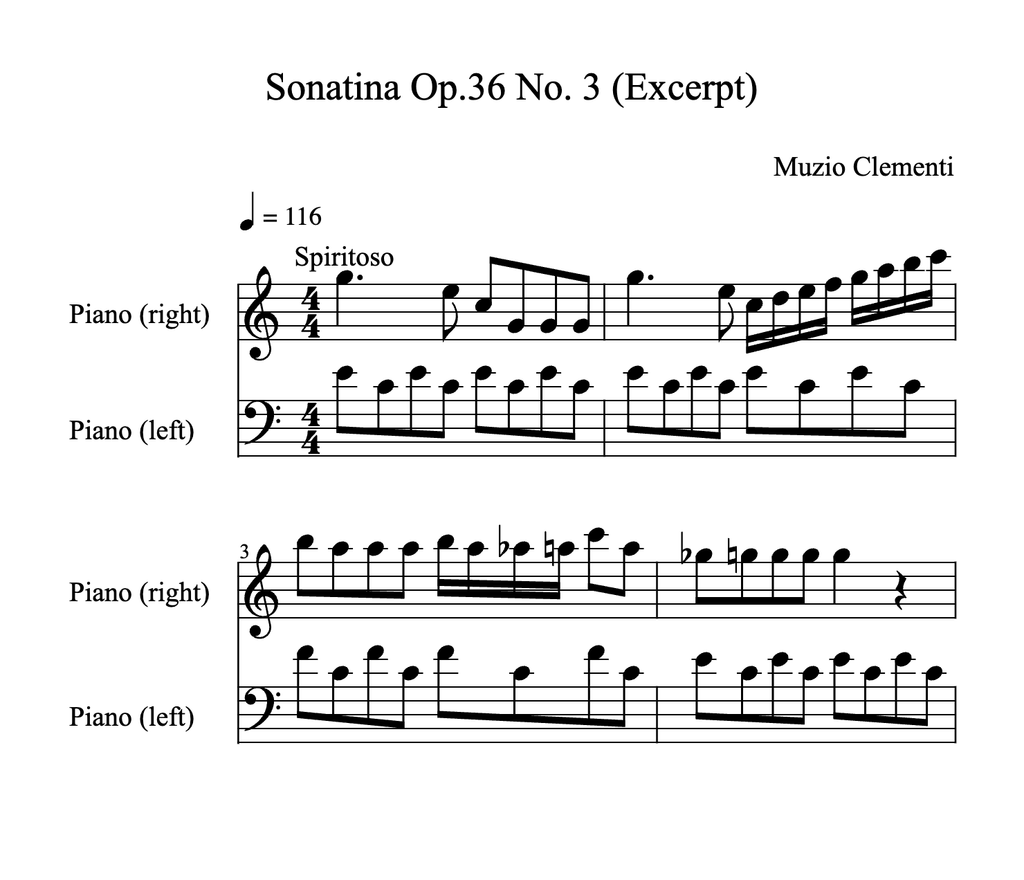
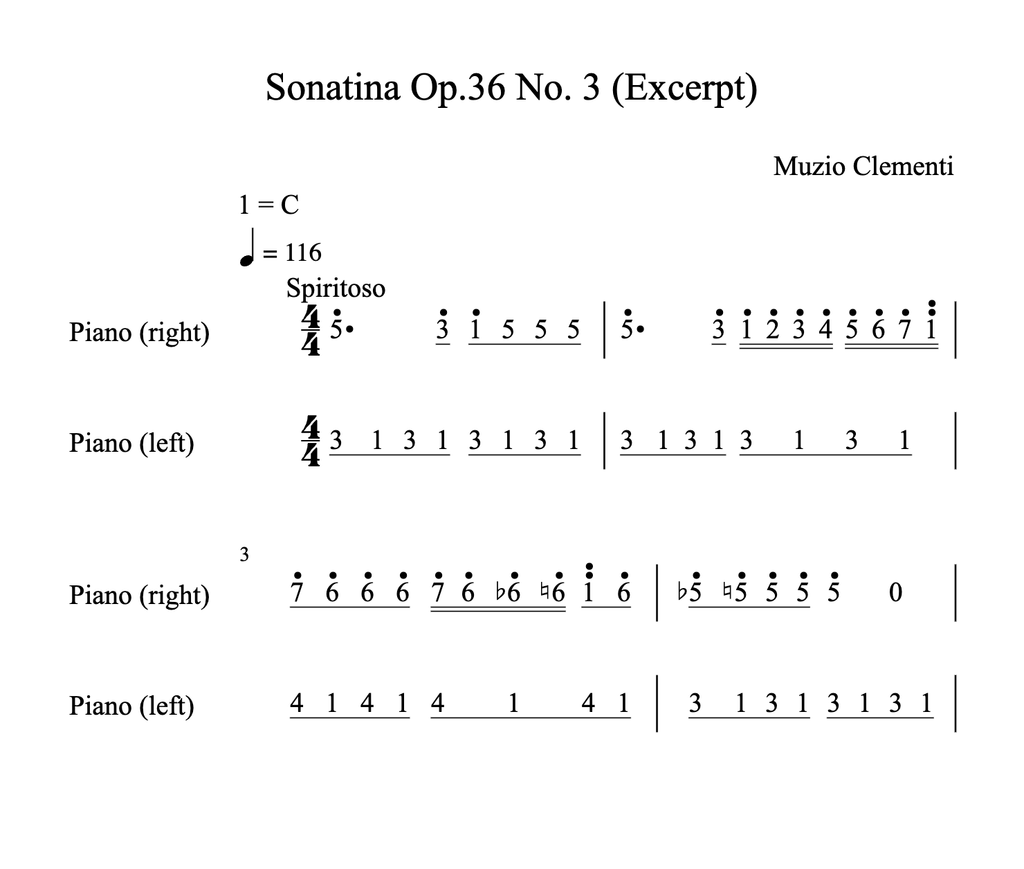
One MusicXML file, two notations
There’s no special Jianpu file format. OSMD takes the MusicXML you already have and draws numbers instead of noteheads: pitches turn into steps of the key, beams into underlines. In the Jianpu build, that’s one rule:
const osmd = new opensheetmusicdisplay.OpenSheetMusicDisplay("osmdContainer");
osmd.EngravingRules.JianpuAlwaysUsed = true; // default in the Jianpu build, false for classical notation
await osmd.load("sonatina.musicxml");
osmd.render();OSMD reads the rule when the score loads. To switch a score that’s already open, set it and load the file again. That’s what the Jianpu/Classical switch in our demo does.
Three times faster
Our sponsors’ Jianpu build ran on OSMD 1.9.7 until now. On 2.2.1, it gets all the performance work of OSMD 2 (see the 2.2.0 release post). We timed 10 scores in Chrome: Jianpu now renders a median 3.2 times faster than the 1.9.7 build, from 2.2 times for The Entertainer to 6.6 times for a large orchestral score, and loads 1.7 times faster.
Key changes the way Jianpu writes them
Until now, Jianpu showed the key once, at the start. A key change later in the piece got no label, although the numbers after it were already counted in the new key. Not ideal for a notation built on “1 = key”.
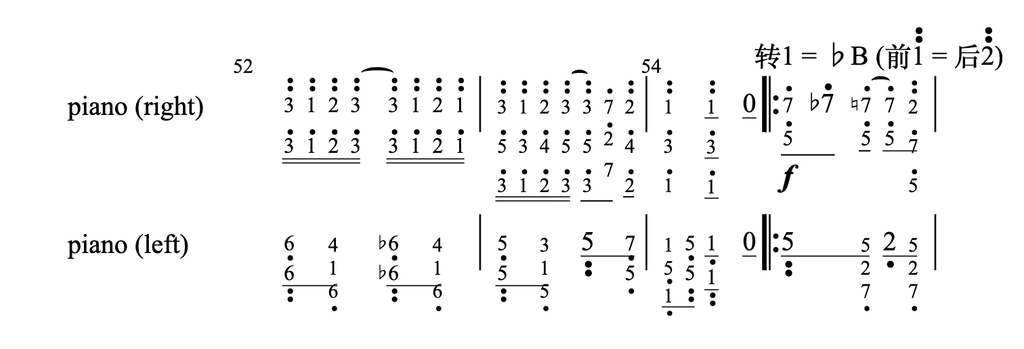
Now a key change gets the label Jianpu readers expect, over the first note in the new key: 转1 = ♭B (前1 = 后2). 转 means “change to”, and the parentheses link the two keys: the note that was 1 before (前) is 2 after (后). Here it is in measure 55 of Scott Joplin’s The Entertainer, where our sample moves from C to B♭ major:
Around keys, also new:
- A new movement in another key starts with “1 = F”, like the start of a score, instead of a key-change label.
- The key’s accidental goes before the letter, “1 = ♭B”, as it’s commonly written in China. Set
JianpuKeyAccidentalAfterLetter = truefor “1 = B♭”. - The Chinese words are rules, so you can translate the label:
osmd.EngravingRules.JianpuKeyChangeText = "";              // default "转"
osmd.EngravingRules.JianpuKeyChangeBeforeText = "Before "; // default "前"
osmd.EngravingRules.JianpuKeyChangeAfterText = "After ";   // default "后"
// e.g. 1 = F (Before 6 = After 3)Accidentals that count from the scale
Here’s one we had wrong. A Jianpu accidental shows how a note differs from its step in the scale. We had reused the logic of classical notation, which counts from the key signature, so an A in A♭ major came out as ♮1. In Jianpu, ♮1 is A♭, the 1 itself. It’s #1 now. The fix changed 820 accidentals across 44 of our test samples.
Grace notes, ties and voices
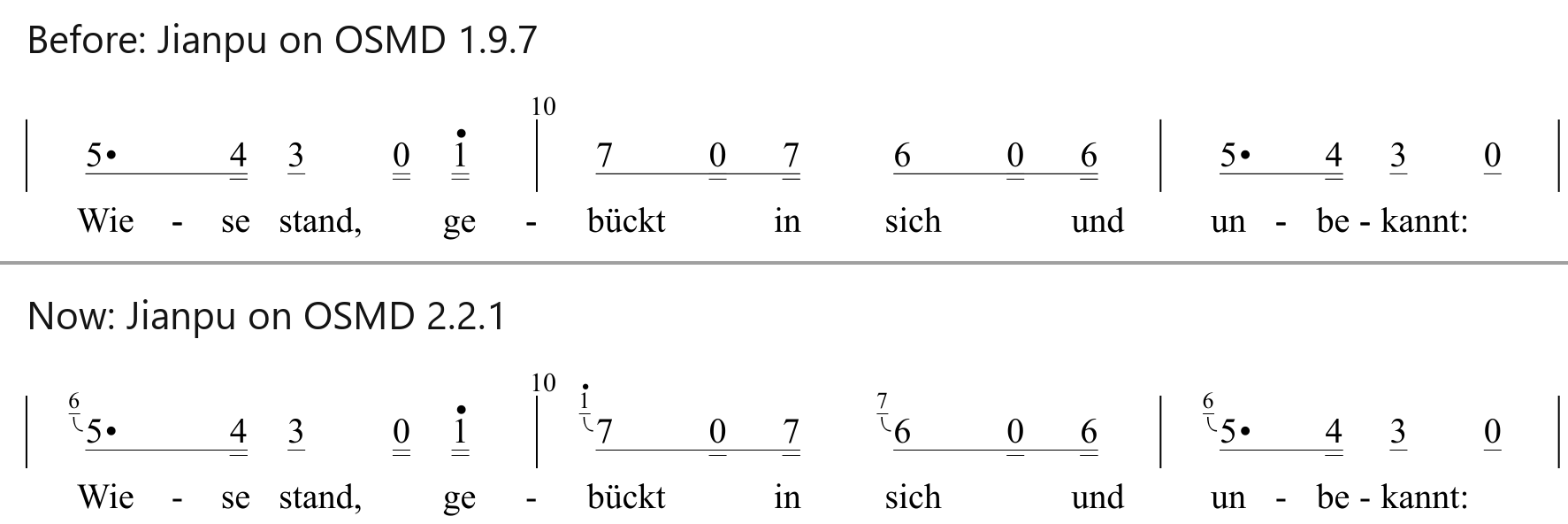
Grace notes sit at the top left of their main note as small numbers, at 65% size (JianpuGraceNoteSizeFactor), with a hook down to it. Until now, Jianpu skipped them:
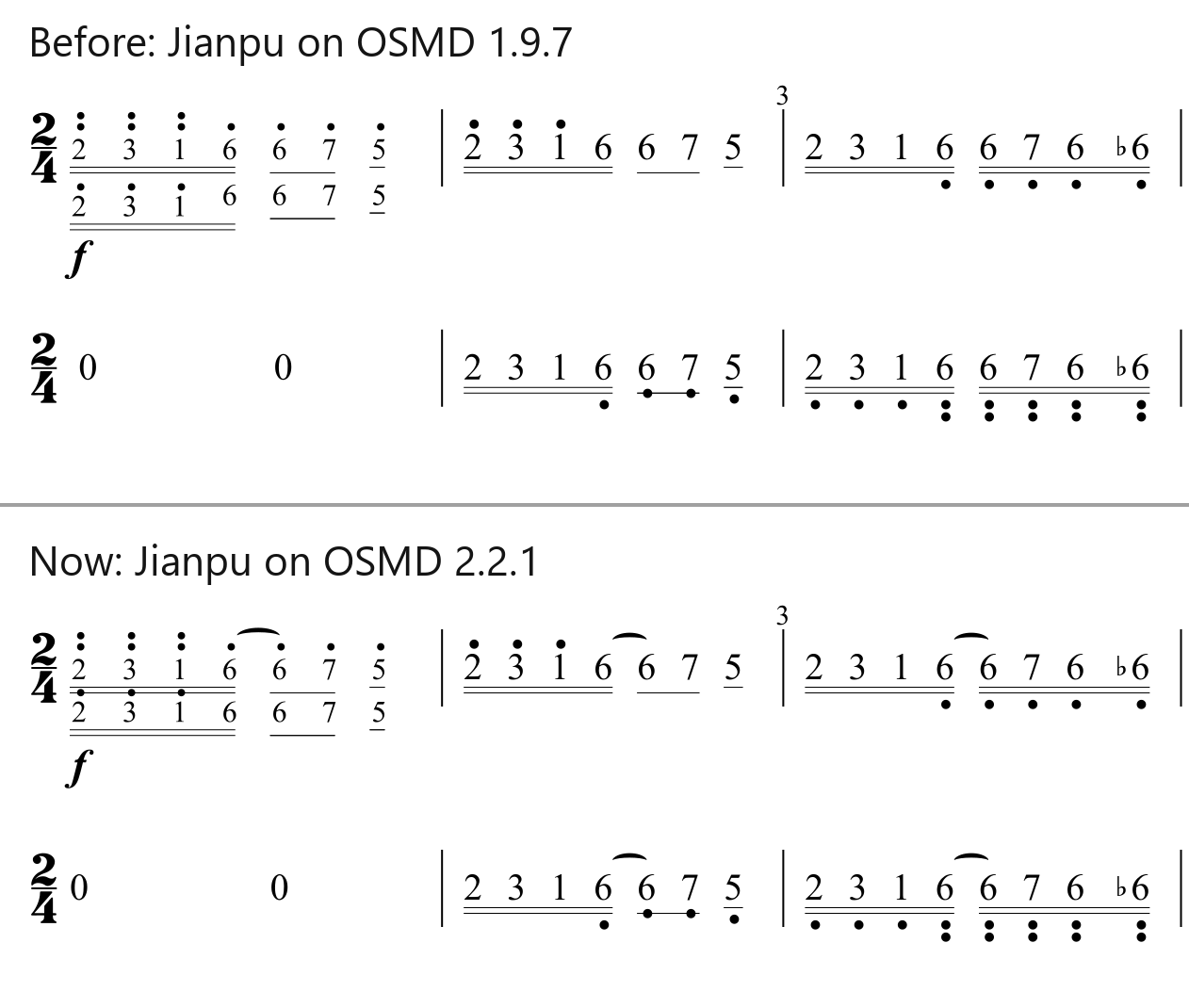
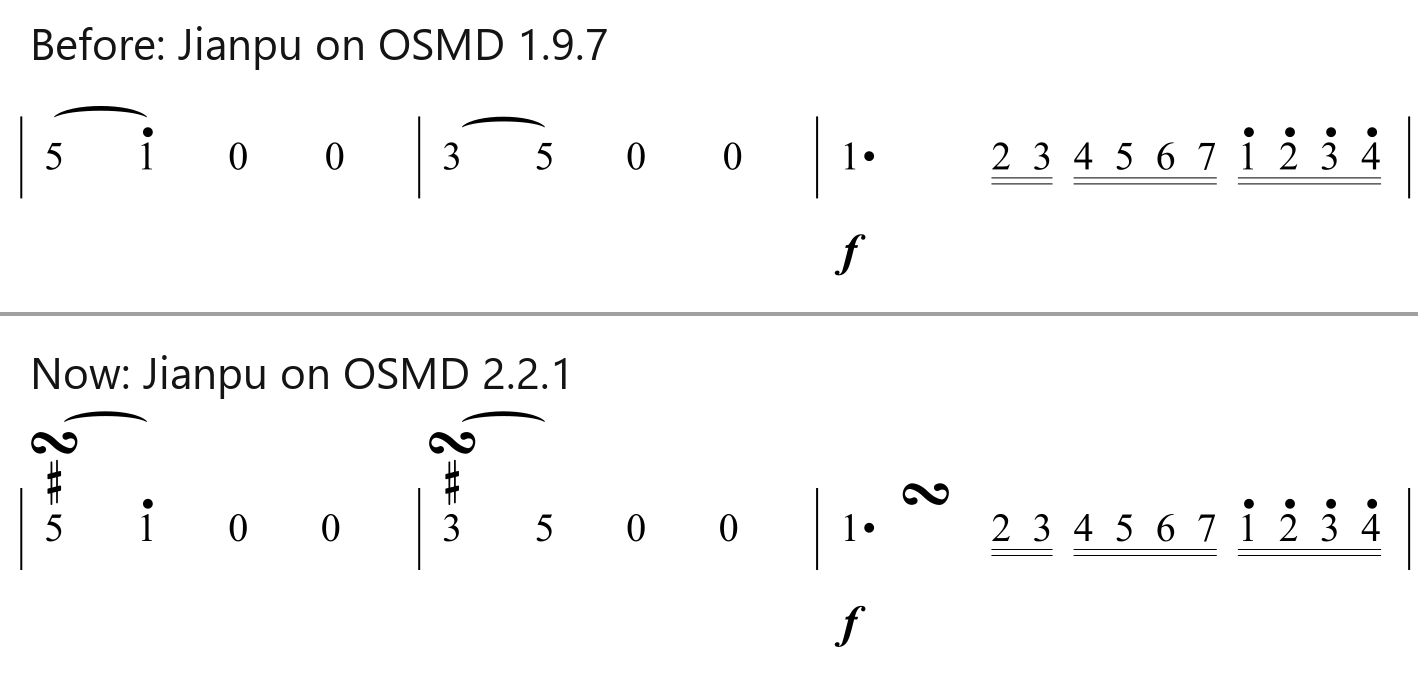
Ties are drawn now, as arcs above the numbers, also across a line break, and a longer slur arcs over a tie instead of crossing it. Until now, ties were missing, as one of our sponsors reported:
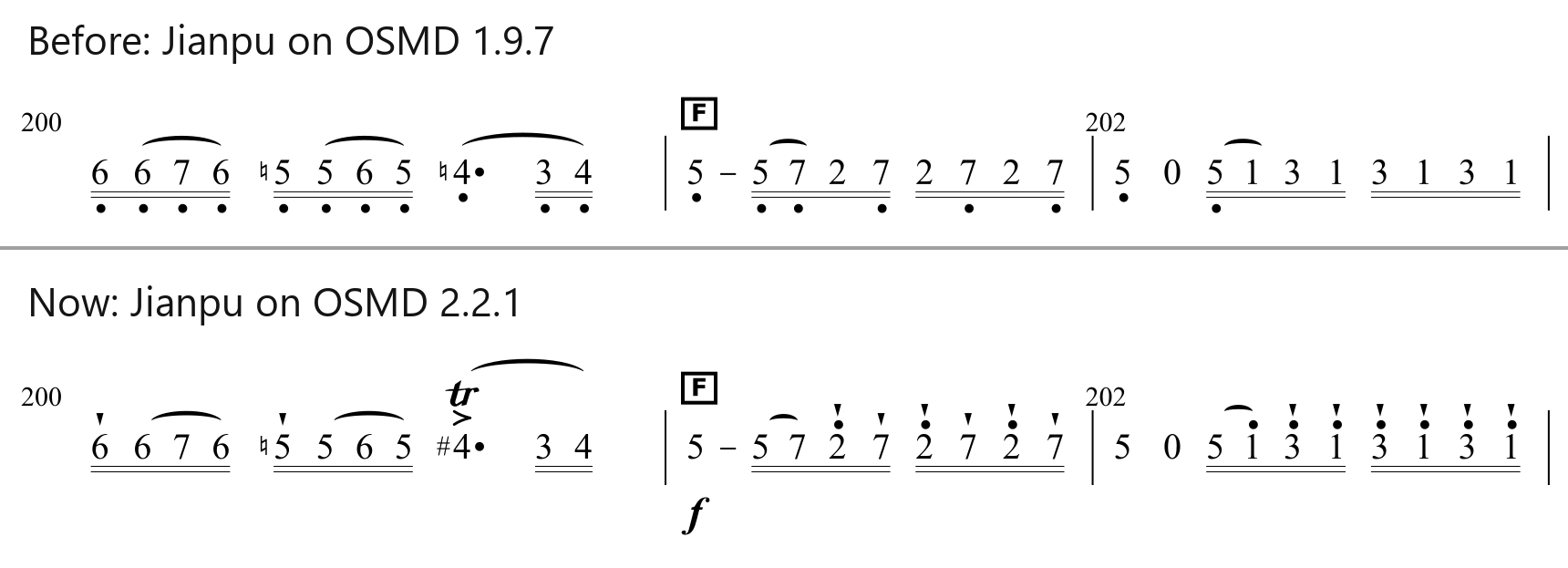
Articulations and ornaments are new as well: staccatos, accents, fermatas, trills, mordents and turns sit above the numbers, stacked the way Jianpu writes them. A staccato is a small wedge, since a dot above a number already means an octave up. Until now, Jianpu drew none of them:
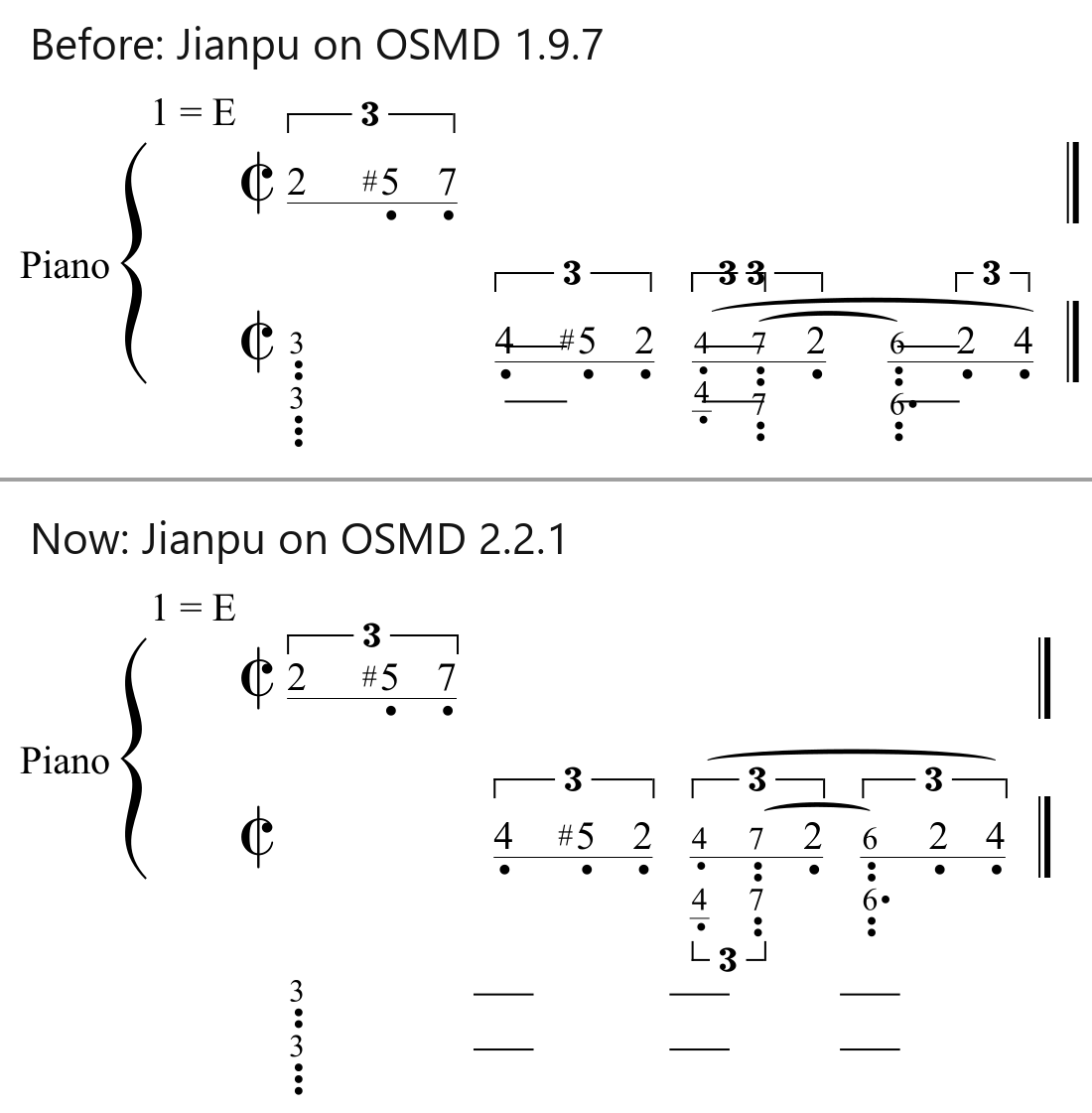
Each voice keeps one line per measure. Tuplets sit right at the numbers of their notes, with slurs around them, and a voice’s consecutive tuplets line up. A lower voice’s articulations and tuplets go below its numbers, like in classical notation. Before, the dashes of a long note could run through another voice’s numbers, 28 times in 7 of our test samples, and tuplet brackets ran into each other and into slurs:
Also new or fixed:
- A long note gets one dash per beat, so a dotted whole note is 3 – – – – -. It used to get a single dash.
- Several measures of rest in a row are written out, one measure of 0s each, and a multi-measure rest from the MusicXML file is drawn as a bar with its number of measures above it. Both used to be a single measure of 0s.
JianpuAutoGenerateMultipleRestMeasures = truedraws rests in a row as such a bar, too. - Notes under an 8va bracket show their octave with dots only, as Jianpu is usually written. With the bracket on top, the octave was counted twice.
JianpuDrawOctaveShifts = truebrings the brackets back. - Chord symbols are drawn above their numbers (they ended up in the top left corner of the page), two-note tremolos between their numbers, hidden notes (
print-object="no") stay hidden, and B♭ and B major melodies are no longer written an octave too low.
Playback, transposition and colors
The Jianpu build includes our audio player, so the cursor follows the numbers while the score plays, and the player’s newer features work in Jianpu too, like a count-in and WAV or MP3 export. The Jianpu demo plays now as well, which the 2024 version didn’t.
Transposing is where movable do pays off. Move the Clementi up a whole tone and classical notation redraws every note. In Jianpu, 1 = C becomes 1 = D, and every number and dot stays put. That’s new, too: until now, transposing a Jianpu score changed the key but got the numbers wrong.
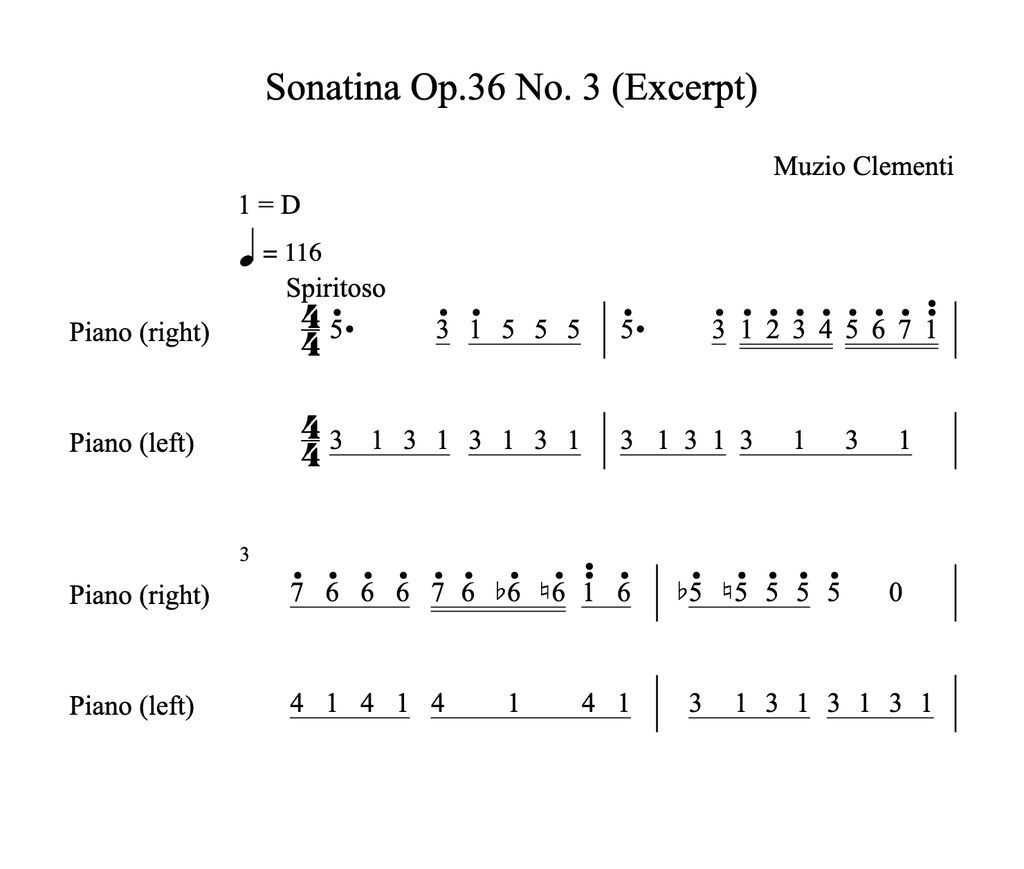
osmd.TransposeCalculator = new opensheetmusicdisplay.IntervalTransposeCalculator(); // keeps the spelling: ♭6 stays ♭6
osmd.Sheet.Transpose = 2; // semitones
osmd.updateGraphic();
osmd.render();The IntervalTransposeCalculator came with OSMD 2.2.0. With the default calculator, the A♭ in measure 3 becomes an A♯ instead of a B♭, which Jianpu then writes as #5 instead of ♭6.
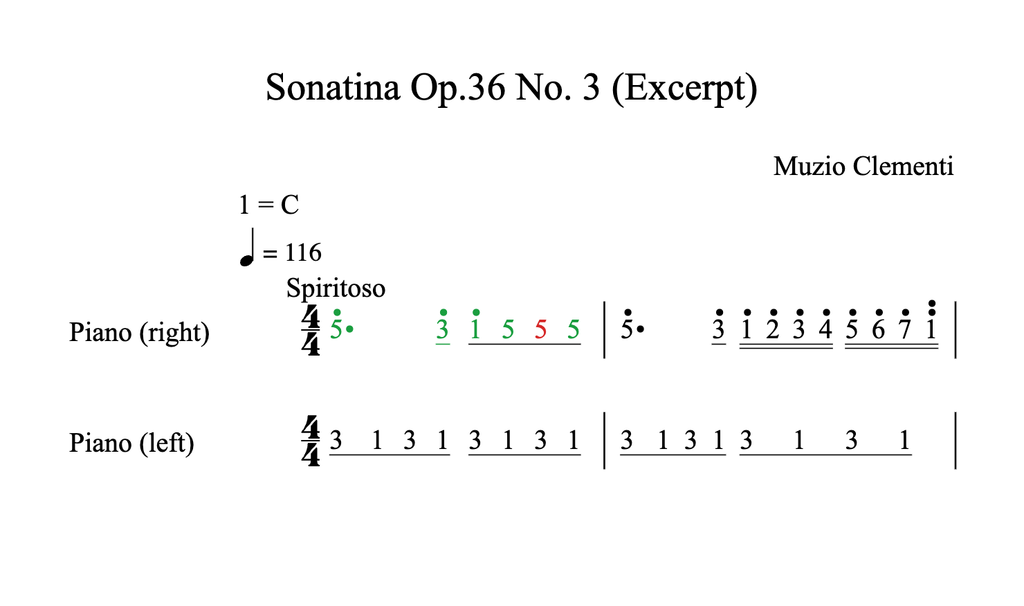
Colors work as in classical notation: from the MusicXML, or from your code before or after rendering. A sponsor asked for this, and it’s what a practice app needs to mark notes as played right or wrong:
for (const gNote of osmd.cursor.GNotesUnderCursor()) {
  gNote.setColor("#1a9e3f"); // number, octave dots, accidental and dashes
}
And if your app jumps to a note on click: GetNearestNote() finds the Jianpu numbers now. Before the fix, it found the right note for 3 of 13 numbers in one of our tests.
What doesn’t work yet
- Jianpu is on for the whole score or not at all. A Jianpu line above a piano staff, as in many Chinese vocal scores, isn’t supported yet.
- Single-note tremolos aren’t drawn in Jianpu yet, nor are cross-staff slurs and the tuplet marks of cross-staff tuplets.
- The switch,
JianpuAlwaysUsed, may still change.
If you read Jianpu every day, you’ll spot things we don’t. Tell us on Discord.
How to get Jianpu for OSMD
Jianpu is a sponsor feature. Sponsor OSMD on GitHub from $14 a month, fill in the sponsor sign-up form, and we’ll add you to our sponsor repository, osmd-extended. The Jianpu build is on its feat/jianpu branch (version 2.2.1-audio-jianpu).
Want to see it first? Open the Jianpu demo, press play, and flip the Jianpu/Classical switch in the side panel.
Your sponsorship pays for work like this. We could not do it without you 🙂


